Database Skillshare

Databases! Apparently they are useful. In a quest to better understand this gap in my knowledge, Rahul, Yu, Joshua, and I sat down.

There are so many tools out there. What you invest in learning is important because you don’t know what will still be around, especially the web-based ones.

Relational Databases

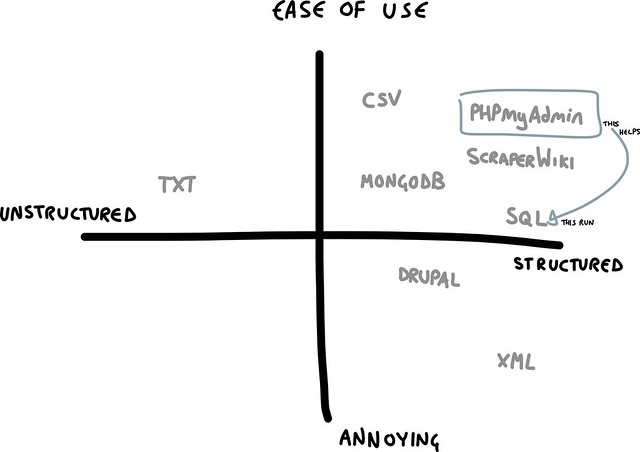
SQL as a way of querying a relational database – pain to learn, as it’s a programming language. Things like ScraperWiki help make that easier.
Can deal with your data in much more subtle ways. Worth it for the expertise and/or if you need to slice and dice to find stories in data.
SQLite is basically a database file on your computer. Can speak SQL to it. It’s behind your mail, your interactive nametags, etc. But if you want to share the data, you have to mail the file to someone. Doesn’t merge changes – have to treat it like a file. But for a one-off-research thing, it’s great. 10s of thousands of rows. Great for Python scripts, there are some UI tools (Lita – Adobe Air app). Research one-off
ScraperWiki can mod a file into an SQL file.
MySQL and PostGreSQL allow for security measures. Web apps. Runs on a server – you have to send queries to it, it sends things back. There are shortcuts to making this happen.
Xampp installs PHP, PHPmyadmin, Apache.
PHPmyadmin lets you talk to MySQL in a nice web-based UI.
Every row has a number. Numbers are unique per table. This is how they reference each other. Never put information in two places (unless you really need to).

Some Tools
SQL To learn the language, Scraperwiki.com really helps with playing around.
CartoDB is great for mapping things.
Import.io sets you up for easy scraping. So if you wanted to scrape moma.org, you would teach it what you wanted, and then tweak what it came up with.
Open Refine as difficult to learn but gives a table of charts as a correlation that plots column to column – helps you see if there’s a correlation between variables. Can group things for you based on different spellings because Google.
NaviCat does data transfer from one database to another.

Non Relational Databases

Joins are a pain! Screw that! Document database. Javascript Object Notation (JSON as a nice form of XML)
Don’t know what the structure will be yet. No standard way to query it. Write code to query, there are libraries and examples to help. Need a quick way to store data and fetch it.
When pulling in information, it’s nice when it’s already structured (like when Civic pulls from the Globe, they’re including word count, author, date, etc – some scripts were written for it, but…
Some Tools
CouchDB defines what is present, then pull and push. Difficulty is in querying it – there is no standard for that.
MongoDB updates and syncs well.
Firebase lets you play with these structures easily.

Spreadsheets
Tableau does some pretty awesome things. If you just want a visualization of the data in a spreadsheet.
Statwing also does the statistical analysis of the data you input.

Useful links
kkovacs.eu
http://datatherapy.wordpress.com/2013/10/24/tools-for-data-scraping-and-…
howfuckedismydatabase.com

Social Accountability

Most of the projects I work on involve me holding myself accountable. I don’t have a boss to fire me, just the possibility of losing gigs and support. I don’t have relationships with people that require certain actions from me. The side projects I tend to take on take place over a long period of time and involve many parties.

Checking in regularly with a number of people I trust, but am not accountable to or for, helps me stay on track with (and realistic about) my workload. Especially related to side projects.

Not Your Usual Checkin

These are people you are not directly accountable to. They are people to whom you strive towards being socially accountable. This mainly boils down to working with people you desire the respect of, but are friendly enough with to fail in front of. No part of your livelihood should depend upon your honesty (obviously, I hope this would be the case in any job, but the dream is not yet the reality).

Tom sez: The Table is Round : There is no project manager. Rather, participants ask one another about their projects. “So Tom, how is ‘Writing a cover letter’ going?”

Fin sez: I really like the informal and casual tone we keep.

Have a Regular Call Time

You might tweak this regular call time to later in the day or that week occasionally, and let people know if you won’t make it or need to reschedule. Some weeks everyone will miss together. Just keep going. Assume it will happen the next week at the regular time. If people consistently miss, ask them if they mean to make it. Remove them from the workflow if they can’t commit on at least a semi-regular basis, welcoming them back if they are able to prioritize it again.

Have a Place to Meet that Doesn’t Rely on Any One Person

Charlie set us up with a persistent Unhangout. No invites, no person flaking preventing an easy join, just. showing up at the regular time. The code to set up such a thing exists here. It can be a little intense for someone to install and run on their own, so if you’d like to use the hosted service for a permalink, do so here.

Update: we now use a permalink at meet.jit.si

Choose a Platform

We use Trello. Generalizable enough to make sense for various projects, public, low barrier to entry. Especially useful with its API so some of us plug into our more finely detailed project management software.

We use the following Columns:

  • “Backlog” for things that may or may not happen.
  • “ToDo” for things yet to be worked on, or that have stalled out.
  • “Doing” for things that are in progress & are being actively worked on.
  • Update: we now also have “Blocked” for things which are out of our hands in how to move forward.
  • “Done” is the high-five column, which gets emptied every check-in.

We also assign tasks to ourselves, so everyone can have an overview of what others are doing – and thus can take over “moderation” of the call.

You’ll slowly start to notice that some things you meant to do just… aren’t being done. Put them on a back burner. After awhile, either admit they’re not going to get done, or restructure them to be approachable and actionable.

Generalities, Not Atomized

All of our participants have personal task management on various platforms. This is about what we’re generally needing to get done, not the granular aspects. We each have our own systems for those more specific aspects (I use OmniFocus on my desktop, tho thinking of switching off, and TeamBox for GWOB).

This has been super useful for me in staying on task, delivering on long-term projects, and in feeling connected to a group of people even when my work isn’t. Hope you find it useful, too!

Open Badges for Crisis Response

Just before the Dublin Hacks event, I found myself in London for Mozfest, the yearly conference for Mozilla. I was there to wander and schmooze, but then I met Jess Klein (now listed on our Who-Is page!). She was working on HackLabs in disaster areas, based on her experience during Hurricane Sandy. What would be needed in any kit (software of space-wise) deployed in times of disaster? It’s a good question asked by many intelligent people who encounter disaster. Because of GWOB’s exposure to so many such people and groups, it’s also a question we know is huge, and one that we create parts and pieces of constantly. Through deep conversation over a couple hours, we dug down deeper: what is a missing component our crew was especially well equipped to deal with at Mozfest?

The Emergency Hacklab team discussed just this question. What we came up with was this: a way for residents in an affected area to indicate someone has helped them. This helps deal with the disconnect between responders and the good work they aim to do.

In times of crisis, there is a desperate need to open up emergency/disaster response data. Communities rush to aid and collaborate both online and in person. There is a convergence of new technology, open source methodologies and grassroots activism. The Emergency Hack Lab tackled the question of how to credential, task and thank volunteers. The UN OCHA offices released an open data set of disaster badges. In a fast paced sprint, our team hacked and built proto-workflow for the UN OCHA Noun Project sets (official process) to the Mozilla Open Badges program. More details from Jessica Klein, Creative Lead, Mozilla Open Badges.

Things we’re super excited about:
This wasn’t about reinventing the wheel, it was about doing something innovative with existing pieces. We pulled from the UNOCHA Noun Project page. We are building a badging triage system that can function on top of existing grassroots and relief technology such as the Participatory Aid Marktplace and Frontline SMS using Mozilla Open Badges.

What’s next:

  • Code the SMS system prototype that is detailed in the userflow here:

  • Partnering with existing grassroots and relief orgs to make sure what we build can sit on top of their technology
  • User test the utility of the UNOCHA badges as we have hacked them out here: https://etherpad.mozilla.org/emergency-badges
  • Join us for the OpenBadges call about this Jan 29 – details here

Do we have a plan for deploying this? Testing it?

  • We are looking for volunteers to join our usertesting cohort.
  • We are working with the Hive Learning Network to usertest and paper prototype
  • People all over the world have expressed interest in this including Global Minimum who have offered to work with us to user test once we have a prototype

Learn more at: https://wiki.mozilla.org/Emergencyhacklab and http://jessicaklein.blogspot.co.uk/2013/11/community-aid-badging.html

If you are interested in working on this project – please let us know:

Is it secret, is it safe?

Being in Berlin reminded me that I haven’t been around the hackers I know and love since my last round of gadget aquirement. A lot of conversations have been happening recently around the usability of crypto-aware tools (including an event in DC on Jan 11th that GWOB is doing with OpenITP – you should go!). What we fail to talk about are how easy many existing things are out there, and what they are. Here are some things we did:

Encrypt all the things!

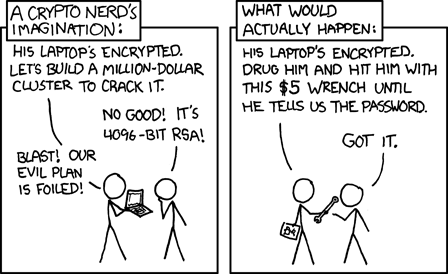
Why this matters: when interacting with law enforcement, you can plead the 5th around your password, but the hardware itself can be seized, albeit sometimes for a short time. During this, they can take an image of your disk, IE, scan and copy anything on it. By encrypting your device, all they will see is adsfliu9p8aerkadfov8c79234hfgia etc instead of “ohai.”
File Vault

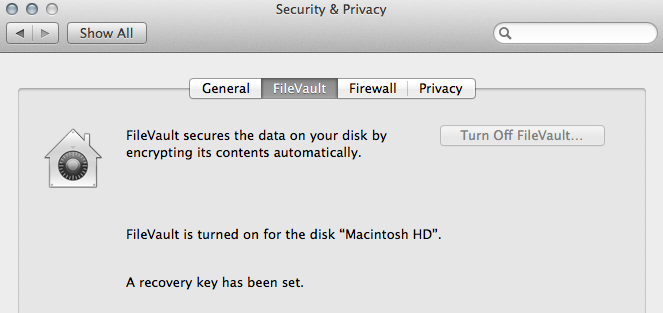
  • A Mac. It’s not as hard as you think. With a solid state drive, it takes about 45 minutes. Let it run tonight while you head to bed. For a Mac, plug it in, launch System Preferences > Security and Privacy > File Vault > Encrypt.
  • An Android. Also not difficult. Settings > Security > Encrypt Device. Again, you’ll need to leave it plugged in and have a bit of patience with it.

Password Management

Why this is important: helps you not fall into password reuse issues by allowing you to only remember one strong password, and loading in non-human-memorable passwords.
On Mac, I went for 1Password. It costs some money, but it’s hella easy to use, and I can share an encrypted file via dropbox between my multiple devices so I can still access accounts. While I’m plugging in these accounts to 1Password, I’m slowly changing all my less-secure passwords for randomized ones.

Communications

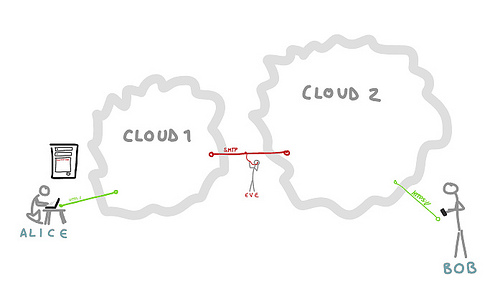
drawn for Morgan Mayhem’s Center for Civic Media talk on Coercion Resistant Design

Why this is important: While we’ve achieved HTTPS in most places, within and between larger “clouds” data is not actually sent encrypted. In order for you to maintain your privacy, it’s important for anything you send to be encrypted. All of these are usable in the exact same way from a user standpoint as the things they replace. They just also encrypt the traffic. Try them out.

I already use Adium for Off The Record (OTR) and Thunderbird for Pretty Good Privacy (PGP) on my Mac. I’d use Jitsi but it crashes anytime I’ve tried. Waiting until it works. That said, I also want the messages I send on my phone to be encrypted.

  • ChatSecure : chat on phone
  • TextSecure : already installed, but worth mentioning
  • Threema : also encrypts images etc! Let me know if you’re on it, definitely needs critical mass in order to be usable. I’m K69NNHXE
  • Orweb : Tor browser on phone
  • Orbot : Tor node on phone

Self-Hosting

Why this is important: you control your data. Or at least someone you can go punch in the face does. I am also incredibly hungry at this point of writing this post and thus this section lacks detail.
Uberspace : I like this group out of Berlin. They’re pretty great.
Ownweb : All the functionality of calendar, contact storage, etc. Works beautifully on Uberspace.
edit: Make that OwnCloud. Thanks, Natanji! Also, hosting on your own of course requires the mental and technical to maintain those servers.

Is it safe?

When is the last time you ran a backup? Why not right now?

<3 to all the fine folk who helped out with this : Tomate, Herr Flupke, Morgan.

Who’s (Not) Welcome at Hackathons? 

Hackathons are for hackers! Right? That seems pretty… exclusive. After all, part of being a hacker being 13371? Heck, maybe I even used the term “1337” because I knew it would make me seem more important than some of my audience. And unless someone considers themselves a “hacker,2” it can be difficult to know if you’re welcome at an event. Couple that with the tendency of the tech sector to be heterowhitemalepriviledgefest, and you’ve got a self-fulfilling drawer-full-of-homogonous-nails-prophecy.
Things that let you know an event will be welcoming:

Inclusive language

Do you find the language to the event to be off-putting? It likely isn’t for you. But if there’s a smile and a nod that indicates an awareness and affiliation for the groups you identify with, it shows a deeper connection that will likely manifest in safe space.

  • As an organizer, if you have a group of people with a variety of adeptness in the language of choice at the event, indicating that translators will be available helps include everyone.
  • Also as an organizer, working with people within the groups you hope will attend the event, and asking for honest feedback on language and activities will help make for relevant messaging.
  • Codes of Conduct – having a code of conduct clearly listed shows that you have participants’ physical and mental safety at heart. These provide resource for marginalized people if their voices are actively shut down.

Accessibility

Accessibility isn’t just about language and feeling – it’s often very much about physical ability to attend. Some events will have gone out of their way to make sure these barriers to entry have been removed (or at least greatly eased).

  • Physical accessibility – Wheelchair ramps and elevators – some buildings were built after a time where these were mandatory, others have had these retrofitted (or not). As an organizer, space is a physical manifestation of intent.
  • Child care – Many single parents and care takers are excluded from technical events because kids aren’t welcome. By providing childcare, your event becomes more awesome.. and there are all sorts of workshops for kids! Try SCRATCH or ALICE, for instance.

Alternate roles

Don’t quite think of yourself as a “hacker”? Hackathons which purposefully set out to include those new to the field or a variety of roles to tackle a given subject don’t just need expert coders – they need you, too.

  • Skills required/desired – organizers, by outlining what skills should be represented at an event, from “usability” to “activist” to “end user” to “CSV magician,” you make it clear what to expect and who is welcomed – which isn’t just to support interested parties, it’s also to give them legitimacy in the eyes of the more entrenched.
  • Workshops – many people who are totally at the top of their game might not feel that they are. By hosting workshops, you provide space not only for new people to learn awesome skills, but you also give solidity to folk who just need a reminder that they do indeed rock.

If we have to espouse why diversity is a good thing, Why are you on this site? Go away.

1. http://en.wikipedia.org/wiki/Leet

2. Information security professionals and enthusists? Anyone who plays with code? People who tinker with systems? More in our I thought hacking was bad!

Why Would I Want to Go to a Hackathon?

I want to learn things!

About a Topic

Subject matter experts are often around to help guide the event’s trajectory. They’re there to be accessible to you, so it’s a great time to ask questions. Better yet, activities are a great way to learn about a topic. By diving in to build something, many blocks and questions are encountered which wouldn’t otherwise be found.

You’ll also be surroundedy by other people with a similar interest, based on the hackathon topic. And everyone has different peices to the same puzzle – just by talking and working together, you’ll learn about other resources and initiatives out there.

About a Tool

Again, no better way to learn about something than to try it out. With an API or a new coding language, trying out a method and approach on a focused topic helps to hone and test. Surrounded by other people who have different skill sets and levels than you do, problem solving is an adventure in challenging yourself.

If the hackathon is around a specific tool, there will be experts and mentors standing by to help you out. They love answering questions – from the very basic to the ultra challenging.

About How to Work With Others

Maybe you’re a college kid. Maybe you’ve been learning something on your own for awhile. Regardless, you want to learn how to apply your skill and interests with a group of people. To work on a team! It’s a real-world thing. You can read all you want to about it, but at the end of the day, to learn how to work with others, you have to.. work with others.

I want to win!

Monies!

Hey, that’s cool we all have bills to pay! (Or shiny things to buy…)

As with all things involving money, be cautious of the cash prize. Though most groups offering a cash prize are probably only trying to sweeten the pot on a dry dataset or API, some will use money for more dubious ends. This may mean giving up intellectual property rights or developing products with ethically ambiguous missions.

There is also a “sweet spot” in the amount a company is offering. Too big a prize, and your chances of winning diminish past the value of your time spent.

Your best bet is to read the challenge thoroughly and determine what the hosts are looking for, and how much you would charge for a similar project in a freelance setting. Remember, there’s no guarantee that you will win, so for a cash prize hackathon to be worthwhile based on the cash alone it should be at least double what you would charge a client for the same job.

If the money isn’t the only thing pushing you to sign up, then you can adjust accordingly. At the end of the day, cash prize hackathons are only really worthwhile if you’re also having fun doing it.

Prestige

Yeah we’ve all been there. Fresh out of design (or liberal arts, communication, etc) school, or in the middle of a career transition and finding yourself in need of some people “in the real world” to back you up and say you did a good job. That they would hire you. That they enjoyed working with you in a professional setting.

Well, hackathons are great for that! You get out what you put in. If you go in with your game face on, you stand a much better chance of meeting someone authoritative to expound your abilities to the next company you interview with.

Hackathons are also a great place to show off your chops, and play around with tools and techniques that you can never quite get your bosses to buy in on. Everyone loves that dopamine rush that comes with showing off the latest jquery library no one has heard of, or writing a mind-blowing parallax landing page that wins your team some cray swag!

I want to meet people!

People to Share Passion with

Welp, guess who else is giving up rare off-time in order to use skills they usually get paid to use? The other people attending! And why would that be? Because they’re just as passionate and interested in this topic! I bet if you talk to them, you can commiserate with / inspire each other.

To Work With/For

Hackathons are a great chance to try out working with new people. You might be looking for people to help you out on an existing project, or to help build the next big thing, or to just appreciate/compensate you for your skills. By working together in an high-intensity, high-fun environment, you can see what they’re like in personality and ability.

  • To Build a Business With – Maybe you’ve got a great set of skills and a desire to launch a product that will change the world. If only you could find the missing parts of that perfect team!
  • To Continue this Project – I’ve been working on this project for AGES, and I want people to work on it with me! It’s totally awesome, and the documentation is swell, and it sure would be great if other competent people could help carry it forward.
  • To Work for a Business – Are you just waiting to be discovered? There are a bunch of recruitment hackathons out there that can help you strut your stuff and get hired into a company.

To Make Friends

I really want to make friends with people who share interest and a desire to take action around those interests. People feel really good when they get to be creative, and so their happy brains will mash with your happy brains and maybe you’ll be friends.

It’s also a serendipitious space – not always the usual suspects (depending on teh event), and so you’re likely to meet new people you share intersts with, but aren’t already in your roster of folk.

I Want to Get Things Done!

Being surrounded by a buzz of productivity sure does make one… productive. And whether from intrinsic motivation, or big cash prizes, or the friendly pressure of those around you, you’re likely to surprise yourself with the pace at which you can work in these settings. Bringing that enthusiasm and dedication into the rest of life can really up your ability to examine everyday working methods and have interesting output.

About This Site / Contributions

This site was created out of frustration and love by Willow Brugh and J. Nathan Matias, with hefty contributions from a staggering number of brilliant people. Pages and interviews continue to go live through the end of 2014, when the site should be considered static. Willow and Nathan are both affiliated with Center for Civic Media at MIT’s Media Lab and Harvard Law’s Berkman Center for Internet and Society in vague to concrete ways.

Want to Contribute?

Awesome! We’d love to hear from you.

You can set up an interview with Willow via meetme.so/structures, or email us your ideas to jnmatias and bl00 at media dot mit dot edu.

Kav of Startup Weekend

Introductions
Willow Brugh: Tell me, who are you?

Kav: Kav Latiolais

Willow: What are you into? What sorts of things do you do?

Kav: S lot of stuff. I do a lot of consulting around [inaudible 00:20] start up, customer development, design competing, a little bit of what they call liberating structure, which is a really cool thing, you might want to talk to the folks who created that at some point. That would probably be good. I’ve facilitated a lot of Start-up Weekends.

Willow: How did you get into facilitating Start-up Weekends?

Kav: It was interesting case. I had a buddy who was going to go to the one in Portland and I was at Microsoft and he’s, “You should come, it’ll be fun.” I agreed to go with him and we ended up taking the train down with the CEO, at the time, who was the facilitator for our event. This was back when they were first getting things off the ground.

I went to an event in Portland and I had a really amazing experience. I had a team of six or seven people. They just did a really amazing amount of work in two days. There were definitely arguments about stuff, but we were, in general, pretty well organized.

It felt like, a little bit like night and day compared to my day job where just planning to get the amount of work done, that we had gotten done over the weekend would have taken at least three days.

I was really excited about that. Mark, who was the facilitator, also the CEO, said, “Dude, I really liked how you ran your team, you did a really great job. Can you coach the next event and help some of these teams with their project management stuff?” I started coaching at different events.

I coached the one in Seattle, the weekend after the one I did in Portland. Probably, two months later, I coached another one and then I think I coached one more. Then, they asked me to go start facilitating, or to organize one and then start facilitating because they want you to organize one first.

I organized one at Microsoft in Redmond. Next I actually ended up flying out as the backup facilitator. It was really like a technical facilitator, that event I did in Tel Aviv, a joint Israeli Palestinian event. They had a facilitator already, but the budget had money to bring out a technical expert, so I came out then.

I ended up doing a lot of the facilitation there. The guy who was their facilitator was a great guy. He just didn’t have the relationship with a lot of the Palestinian folks I did, because I spent a few days in Ramallah, while working on them on some stuff.

•    Hackathons
Willow: Cool. Tell me what you think about hack-a-tons.

Kav: It’s an interesting model, and it’s more talking about start-up weekend specifically, and its relationship to hack-a-thons. I grew up in [inaudible 03:24] culture as most developers my age did, where a lot of people got into coding was to scratch their own itch. I got into programming, because I was really frustrated with a video game, I was playing and I wanted to make it easier, which is not at all how programming works but I was 12-years-old then.

We grew up writing apps, to entertain ourselves, and to make our lives easier. The hack-a-ton model has really grown out of that, the idea of I want to build a utility for this or I want to build a framework that does that, because it’s a problem I keep running into and I don’t think anyone has really solved this problem.

It used to be that hack-a-tons were very much like get some pizza, get a bunch of people together and we’re just going to geek out on scratching our own itch. That was fun. I did maybe one, maybe two of those. Sometimes they’re around a particular technology, so it was come to this hack-a-ton on this new technology. It’s sort of an experience, like you take a course on doing that thing.

Interestingly, I never really got into that. I think, part of it is because the crowd that gets really into that, is into solving technical problems for their own sake. Then, I think the other interesting historical world is the business plan competition. The business plan competition, being the place where as someone who has got an idea for business, you sit around for a month or whatever and write up your business plan.

It’s this 1,500 page monstrosity full of made-up shit, and then in the business plan competition, you go up in front of an audience, pitch all this made up stuff that you’ve got and then everyone decides who’s idea seems like it’s most realistic, or most likely to make money, or whatever and they give you a reward. A lot of Start up Weekend is about bringing those two things together, to get rid of the lame elements of both.

Let’s build a product that’s focused on an actual business, and let’s learn about what that business might actually look like, and then from the business side let’s make sure we’re actually validating real business concepts, instead of making shit up. I think, as start-up weekend and similar events have matured, they focus more and more on really weeding out the stuff that doesn’t make any sense.

I think I’ve seen that with a lot of other stuff around, civic hack-a-tons will follow a very similar model, where they’re very much focused on the end-user or end customer, rather than on a programmer scratching their itch. I think, an interesting thing is in the field in general, of software in particular. Although I think technology generally could be stated this way, we’ve reached a point where scratching your own itch is no longer sufficient to build a business.

I think, 20 years ago, 30 years ago, 40 years ago, sure. MS-DOS was great, because it helped Bill Gates do this thing, and then he sold it, because everyone else wanted to do that thing too. Any solution to a problem was an awesome solution, whereas know there are already a million solutions out there, so you’ve got to be building something pretty awesome.

Willow: Yeah, I haven’t thought of it that way.

Kav: And with that, you have to actually look at the human beings you’re building for, and I think that is a lot of what was being changed in the world of hack-a-thons, in the last few years.

What do you think the purpose of a hack-a-thon is?
Kav: The purpose of the traditional hack-a-thon, is like sword sharpening and skill practicing. It’s really all about doing your katas, so to speak. Getting better at the stuff you do, or learning something new, or solving a problem that has been on your list forever, and you just haven’t gotten around to it.

It’s very easy, as a developer, to get an itch for something where you’re like, “I have this idea. I want to work on it.” But without people around you who are also working it’s hard to motivate yourself.

I think more and more, we’re seeing really interesting stuff, where these hack-a-thons are turning into business generators of one kind or another. I don’t think probably, five years ago, people were asking the question when they left start-up weekend or a hack-a-thon like event.

I don’t think they were asking the question “How can I make every day of my life look like this?” Whereas I think more and more people are asking that.

More and more young people are saying, “I want to work on something that’s fulfilling. I want to work on something that’s inspiring. I want to work on the kind of thing that I would volunteer my weekend to work on. Not because I intend to volunteer all my weekends to work on that, but because I want to be that happy about it.” I think that’s really one of the most important things that has changed.

I don’t think a lot of actual companies come out of start-up weekend and I don’t think that the projects people work on necessarily continue on, but I do think their appetite for that kind of work really gets blown up.

It’s creative and I think once that appetite, for that kind of work, has been created it’s hard to turn it off, which means these people are now demanding work environments that are more empowering, and allow them to work faster in smaller groups, more effectively, on interesting problems.

Historically in the large corporate environment there’s a certain amount of, “Well this is the way it has to be, because this is the way it has always been, and there is no other way.” I think, more and more you’re hearing in the corporate environment, “This is the way it has to be for us, because of this concern and this concern and this concern.”

I think the large corporate development cycle, is very much becoming not something that people are successfully able to argue is the right way, but they’re now arguing it’s the right way for them because of some special extenuating circumstances. Now, of course, everyone has special extenuating circumstances which makes them not all that special.

What do the projects look like for your events?
Kav: They’re all over the place, depending on what part of the world you’re in. I think, in general, for start-up weekend, it’s a lot of proto-businesses. At the beginning of the weekend, they often look like, “Hey I have an itch, I want to scratch around, not a technology problem I have”, like, “Oh my market is really good” by converting capital letters to lower case letters.

“Every time we go to a bar, it’s really annoying to wait in a long line at the bar, and it’s hard to get a drink, so I want an app to help do that. Tonight’s thing is over the course of the weekend, that office goes away right, because if you actually invested in the problem of “there’s always a line at the bar, it’s hard for me to get a drink”, there’s no business in solving that problem because the person who would pay to have that problem solved and that’s the bar.

That’s not a problem for them. They’re probably partnered or grouped with each other. They don’t give a shit if you have to wait.

In fact, optimally, someone is always about to wait or just waiting.

They start out quite often, like personal, itch scratching and then they tend to turn, if the folks actually do the work over the weekend, they tend to turn into concepts that make significantly more sense as a business.

There are some perennial favorites. We kind of joke, and this is a horrible thing to admit to, but we kind of joke that there should be a start-up weekend drinking game, where you drink every time, someone pitches and idea targeting affluent, young, white men.

Because every one that you go to, it’s like, “I want to build a dating site, it’s hard to meet women.” Well building a dating site is not going to solve that. “I want to build an app that makes it easier for deciding which restaurant to go to. I want to build an app that will help me find cool plans.” I think there’s a lot of good stuff there. Quite often [inaudible 12:36] at a restaurant.

Willow: Interesting.

Kav: A lot of it is micro-optimization of middle class to upper middle class white, young men.

Willow: I remember that, from one of the ones I was at.

Kav: Yeah, the dating app,for example, is exactly that. I understand it. Part of it is because you’ve got a weekend, you’re not going to really get too crazy about anything real. One of the one’s on my list, is I want an app where I can text it that I’m about to start drinking, and it will text me every hour, to ask me if I’ve had water recently, or to remind me to eat.

Then when I’m safe at home I text it, “I’m home, stop bothering me about water and stuff.”

That’s not a universal problem, the fact that I drink too much while not paying attention and forget to drink water and forget to eat. I don’t see that as a hit, but it would be an entertaining thing to build over a weekend.

I think hack-a-thons still keep to their roots a little bit in that, even though people are pretending to thinking about businesses, and pretending to be thinking about customers that are not themselves, I make a lot of info [inaudible 14:05]

What ends up happening to some of the projects after the event?
Kav: Franck will give you a bunch of statistics that he collected at the start-up weekend offices, to hear the actual numbers of how many teams continue on, how many projects continue on. I’m not certain I believe those numbers, but it would be worth getting them.

I think a lot of times, and I have no quantitative data, but from observation and my qualitative experience of it, a lot of the times, the teams keep working on the projects they’re working on. Particular teams that either placed, or really executed well over the weekend, they have a tendency to continue to execute well.

Their progress slows to almost nothing though, unfortunately, because they don’t devote enough time to it, and the people who are most valuable on those teams, are the people who are most over-committed already.

Another thing, there is it’s difficult for a start-up weekend project to turn into a real business, because the teams are quite often five to six people and investors are not going to give money for a founding team of five. Invariably also you pick each other because you met on Friday night. There are team personality and dynamics issues. There are competence issues with some of the people in the group.

Navigating that particular “Tetris piece” is quite often not something people succeed at. I think the ones that do really do a great job though.

The teams that are able to say, “Look dude, you didn’t help over the weekend, you were kind of a pain in the ass then. While you are the person with the most available free time, to be working on this, none of the rest of us have any time. There’s a reason for that, and we don’t need you, so goodbye.” I think teams that effectively say that, are the ones that can kick ass.

What are the attendees of your events like and what do they get out of the event?
Kav: I think, a lot of what they get out of the event, generally before I talk about the specific categories, in general, a lot of them meet people they want to work with in the future. A lot of it is a power networking thing. One of my favorite app pitches that you see time and time again at start-up weekend, is an app to help you more effectively network with people at events so you can make better connections.

If you look at start-up weekend, that’s exactly what it is. Everyone who is on the team, together, builds a pretty good bond. I’m definitely still in contact with all of the people from my first start-up weekend team, and I’m in regular contact with most of the people I’ve ever worked with at a start-up weekend on anything.

Some, more so than others, but, in general, we all keep in touch and we’re pretty close because of that shared pressure, shared past, shared struggle, shared striving towards the goal.

I think the networking or community building aspects of it are often undervalued. In terms of building a successful technology community, start-up community, any of these things. Like the value of having a group of people who worked together, even for just a few days, and know what each other are good at and bad at, and excited about, and not excited about, and how everyone responds to stress.

Do you become really mean? Do you over communicate? Do you under communicate? I think that’s really valuable.

As opportunities arise, we now have a network of people, who are well-connected to each other, but also who really, truly understand each other’s capabilities, and help move the right people in the right place at the right time.

I think, specifically, shape of attendees…We have three different attendee types at Start-up Weekend, traditionally, software developers, designers, and business people.

Business people is a bit of a catchall, and what I want each to get out of the event, I have three separate goals for each of those groups.

For me, [inaudible 19:01] Start-up Weekend experiences, one where you actually learn all of the lessons, even though they don’t apply or they’re not, specifically, the one lesson I want you to have learned for your role.

If you come in there and you’re a developer, I want you to learn just how fast you can build stuff, and how you could take an idea from zero to a working, awesome application in two days, because I think a lot of developers work in environments where they’re restricted, or with tools where they’re restricted, and they just don’t understand how fast they can actually build something.

You want the business people to understand that; it’s not their ideas that matter, and that to be successful in business, is not about you being really smart, or you having really good ideas. It has everything to do with your humility, and your ability to listen to your customers, and learn from them, effectively.

For designers, I want them to understand that not all the work that they could possibly do in the world is to spec. Not everything is agency work. They don’t have to act like they’re a slave to someone else’s vision.

Quite often, it’s hard to get designers to come to Start-up Weekend because they perceive it as an event where they’re going to go and work for someone else for free all weekend.

As developers, we don’t have that perspective at all. Developers see it as an opportunity to build something that they own that’s theirs. I want designers to gain that perspective as well .

Now, whether people learn those lessons or not, whether they take that away…Sometimes they learn what you want to teach them, and sometimes they have a more important lesson to learn.

Do you have a favorite story?
Kav: Well, my very favorite story. This is the big, “Why do I do this? Why is it exciting to me?” At a fundamental level actually it did happen at that first Start-up Weekend in Tel Aviv.

Part of it was, “I want to facilitate a lot more”, and probably why I’ve gone all over the world doing it now. I was in Ramallah giving a talk on using Visual Studio for startups because I was on the Visual Studio team at the time.

It was probably my fifth or sixth talk of the day, which was crazy because I had been told I was just going to go meet with some people, and shake some hands, and informally chat with a few people, and every company that we went to, there were like a million people there.

As a result, by the end of talking to a million people, I developed this pattern of questions that I would ask everyone in the audience, as they were coming up and thanking me for the talk.

I’d say, “What idea are you going to pitch at Start-up Weekend. Are you going to go? What idea are you going to pitch”?

There was this girl, who I asked, “Are you going to go to Start-up Weekend?” She said, “Yeah, maybe. Some of my friends are going, but I’m not really sure whether I want to.” I said, “Well, what idea are you going to pitch”? She was like, “Well, I have an idea, but it’s not any good. It’s a really bad idea.”

I’m like, “You should pitch it anyway.” She said, “Ah, you know, I don’t know. Like, it’s really not a good idea.” I said, “It doesn’t matter. Most of the ideas are going to be bad ideas. Just pitch it anyway. I’m sure it’ll be fine. It’s a really great experience to do it, so you should definitely come, and definitely pitch.”

She was like, “Well, maybe I’ll come.” Fast forward a few days. I’m at the start-up weekend, and I see that she’s there so I’m like, “All right. Are you excited to pitch your idea? You know how to take care of all that?”

She was like, “Well, no. I’m not going to pitch my idea. I definitely not. I came. I’ve gone that far. I’ve done that thing, but I’m not going to pitch”. I’m like, “Well, you should, even just for the practice of standing in front of a room full of potentially, honestly, hostile strangers.”

It’s really character building. I do hate to say it, but it is character building. It helps you get better at doing that again, and again, even if you just go up there and, basically, talk nonsense for a minute, and it’s only a minute. At Start-up Weekend the initial idea pitch is only a minute.

You can endure anything horrifying for a minute. I tried to sell her a few times, as people were networking, and she was like, “No. I’m not going to do it.” I was like, “All right, fine.” We go up and I look at the line, and she’s definitely not in the line of people pitching. They pitch. There are some good ones.

There are some really bad ones, including one by this guy. He was not particularly good, but he was like already bragging about it, honestly.

She gets up on stage because we let people go on after the beginning. She gets onstage, and pitches her idea. It’s actually a pretty good idea.

A social network thing, for people with kids who are trying to find…I can’t remember exactly what it was, but I think it was find activities for the kids. I’m not quite sure. She pitched her idea, and then everybody went to vote. They all vote. Her idea gets picked it turns out.

It comes to team recruiting time, and I’m just walking the room keeping an eye on everything. People are recruiting their teams, and I see that she is standing there, kind of by herself looking a little upset. I walk up to her, and I’m like, “Hey. What’s going on”?

She says, “Well, now, no one wants to work with me because I’m Palestinian. All the Israeli people are ignoring me.” The problem here is that, when you’re recruiting teams on start-up weekend you have to hustle.

It’s not something you can just expect people to come join your team. You’ve got to be like, “Hey, what do you do? You should be on my team. Hey, what do you do? You should be on my team.”

She really wasn’t doing that. She was standing back, and she was really saying like, “Oh, this is bs. Nobody wants to be on my team. They just voted for it because they were trying to be nice, but now they hate me.”

We took her around, and we talked to a few different folks who hadn’t found a team yet, and we got her a team of like four or five people who were decent, but one of the people was this arrogant, egotistical guy whose idea, of course,didn’t get picked, and let them go.

They were working, and I went to check in on them a few hours later, and they were working on the arrogant guy’s idea. He had taken over her team.

I was like, “Huh. This isn’t good,” but that’s part of the learning experience. We gave her a little bit of coaching, but didn’t really directly interfere, and then backed off again.

We found out about an hour later, that she had actually sat down with him within that hour, and said, “Look. Your idea didn’t picked, dude. Mine did. So we’re working on my idea. If you want to work on your idea, you can go do that somewhere else.”

She kicked him out of her team, which was really kind of awesome because she went from being afraid of everyone in the room, to being able to tell somebody, “Look. This isn’t what we’re doing.”

She then recruited some of the folks in Ramallah that hadn’t been able to get the permits to come into Tel Aviv. She recruited them and worked with them over Skype. She got her whole team working pretty solidly on the design page. They built a lot of stuff.

The thing they built was a pretty comprehensive, there was even a lot of crazy animation and stuff. There was a lot of good stuff there. She went and pitched it on Sunday, and did a marvelously great job, and it ended up coming in second or third place for the event. I think second place, and totally deserved it.

There was no like, “Oh, this is a Palestinian girl, we should give a Palestinian a slot on the winning teams.” No. She totally killed it. We finished up the event. We were celebrating and stuff.

We went out into the town, and I bumped into her a little bit later, before she was on her way back, and she said, “I just wanted to say, Thank you. Because before, whenever I wanted to try to do something, there was this voice in my head, or whatever, that would tell me, It’s probably not going to work. You’ll probably fail at it.”

She said, “I just wanted to thank you, because I know that voice is wrong. Like, I’ve seen it now. I did something I didn’t think I could do, and that’s awesome.” She was like, “It’s changed the way I think about what I’m capable of doing.”

Willow: Well, that’s fucking awesome.

Kav: I was like, “Fuck yeah. That is awesome.” I was like, “I want to do more of this.” I want to do more of empowering people, who don’t think that they are going to succeed here, to succeed at these things. Right?

Those are my favorite Start-up Weekends. It’s part of why I like to go to crazy countries that no one in the US has ever heard of. Yeah, it’s cool to a crazy country no one’s ever heard of, but the reason I really like it, is I feel like they’re a lot of people there who get ignored. They get overlooked, I guess. You know?

Willow: Mm-hmm.

Kav: Kind of an underdog nation. As individuals, I don’t know that they always see that, but there’s definitely, always, a little bit of a like, “Well, if we were in the US, this would be so much simpler.”

It’s like, “Guys, you actually have great opportunity here. In the US it’s like being in the middle of the ocean filled with sharks. Every little micro optimization already exists in the US. You have a huge opportunity.”

“Your country is, quite often, just getting mobile devices in everyone’s hands. You could be creating significant businesses that operate in this country or this region, that just wouldn’t be viable stateside.”

•    Big Picture
Do you see yourself as a part of a wider movement?
Kav: I would like to. The very deep reason I do a lot of the things that I do, both at work as a part of Start-up Weekend, this is very short version of the phrase is, “I want to end the industrial revolution.”

What I mean by that, is that we’ve created all of these systems around what work is, and the making of things is built on this model of optimization, and consistency, and streamlining, and quantification.

I read a great article the other day. It was something about how Google doesn’t ever want to hire anyone who stands out too much because, of course, if they did, then they would have keep that person forever, because what would happen if that person moved on.

They would lose all the value and, potentially, the things that that person had created would unmaintainable. I just want to get rid of that mindset. I just don’t think that that’s healthy.

Attempting to treat people in a reductive manner, takes away some of our humanity. A big part of the movement that I see myself as a part of, is ending this idea of leadership, as this ivory tower job.

Not ivory tower, because ivory tower is education, but very distant from the front line. I want to bring all of the strategic thinking, all of the leadership to the workers, so that they, as groups, can make the right choices. Maybe that sounds communist.

That’s really what I believe. I believe it’s time for the Protestant Reformation of work. The idea that the boss is the one with smart ideas is ridiculous. I see this time and time again.

I talk to new, cool managers at all these companies. There are people who used to do the work. They used to be software developers. They’ve gotten into a project management, whatever the lead role, and you talk to them about their work.

They’re like, “Yeah. Sometimes, I really love just doing the work, but what I really want to do is influence what work gets done because I have all these ideas, because I’ve been so close to the front lines.”

“I’ve been so close to the customer. I know what the customer needs. I don’t have that strategic scope to make those decisions. So, I’m going to work my tail off so that in 10 years, I can have the reach to control in what direction we move.”

For me, that just seems ridiculous. First of all, by the time you get there, you’re ten years out of date. There’s some other new kid who’s sitting there thinking, “Jesus, we’re executing on a strategy that’s ten years out of date.”

“I’m going to get into the leadership track so that I can reach the point that I can have a say on product strategy.” We need to get into this mode of including everyone more into strategy and leadership. I think, it’s more fulfilling. I think, it’s more effective.

Do you think that hack-a-thons are accomplishing that idea?
Kav: To some extent. I think, they’re showing people what a world where small groups of dedicated individuals with access to the tools to develop strategic insight, what those teams could look like.

I worry a little bit about them, occasionally, being prescriptive. Part of it is we really want to be prescriptive. We’re trying to break another pattern. I do worry about any pattern that’s learned, rather than discovered, as seeming a little forced.

I do think, in general, it’s because it’s exposing people to that way of working. I do think it changes that.

A lot of the hierarchy that exists in organizations today, is about maintaining a perfect picture of what’s going on across the organization.  I think, that seems like a valuable thing, when you don’t recognize the cost. Flexibility, you’re paying for. I think hackathons [inaudible 34:22] help teams understand what it would look like, if they weren’t spending so much of their time focused on tracking the work, and would just focus on doing the work, and making sure they’re doing the right work.

Do you have anything else you want to add to it?
Kav: Probably, but I think that’s good. If you think of anything that seems like I [inaudible 34:57] .

Willow: One of the things that’s come up is the difference between…First of hack-a-tons, were in hacker spaces and hacker cons.

Then, you have ones emerging around the same time out of the open source community, and out of businesses that wanted to do work sprints. It seems like the groups that are doing the entrepreneurship are even newer than all that.

How do you feel about the tie-back to roots. This is not a part of the formal interview, but I’d still like to know your input on it. How does this tie into open source or hacker e-source, or whatever else?

Kav: I didn’t mention this in the earlier part, but it’s worth mentioning. A big part of the “seeing how fast you can develop things” comes from leveraging open source platforms, rather than whatever legacy, corporate, proprietary crap their company’s been using.

I think, that the hack-a-ton, is as much as space to explore a business concept that you’re not familiar with, as it is a space to explore technology that you’re not as familiar with. An opportunity to explore different technology stacks in a low-cost way.

I think, people are making smarter decisions, about what they want to use. As a result, I think there are actually two classes of developers these days.

There are developers who are keeping their ear to the ground, in terms of what new tech is coming out, what’s interesting. What frameworks might be worth playing with? Who’s going to make their lives easier?

They’re kind of dialed into the open source community. They’re trying early versions of stuff. They’re giving feedback. They’re submitting pull requests. Sometimes, they’re even really heavily engaged in the community. They’re giving talks on this stuff.

Then, there are developers who are like, they learned to program years ago. They got a job doing .net stuff, java stuff, or whatever. That’s what they do. They don’t see it as their responsibility to be aware of the latest stuff.

Quite often when they do look at the latest stuff, they find a reason why it’s dumb, rather than really being open to the exploration of new technology.

Given the way the open source community has leveraged all that contribution that it has, it’s actually becoming this generational difference in the capabilities of developers.

Developers who are stuck on an old stack, and aren’t investing in learning new stacks, are slow hands. There’s often trade-offs. They’re code is often more stable, but the idea that you can produce anything in a weekend is insane to them.

They just operate on a whole different time scale. Meanwhile, these others that are getting really into those stacks, contributing, see themselves as part of the larger software community, that helps each other build better software are getting faster and faster and faster, and better and better and better.

Willow: I was typing.. It’s OK.

Kav: I think, that ties into a lot of the philosophical arguments around waterfall, agile, and even some of the post-agile stuff. I think, agile software development methodologies are being pretty heavily co-opted by the system, to turn into waterfall.

Big corporations keep modifying agile, so that it works with their business. What works for their business often means, it goes back to being exactly what it wasn’t really meant to do; which is project out how long it would take to develop software.

Two years, in advance and plan out a feature map and all this… It’s just stuff that was… Agile was really meant to support the developer community, and encourage everyone to be more honest with each other. I’ve seen implementations ignore all that.

Meanwhile, the other guys are starting to ask the question, and it’s the question we focus on, [inaudible 39:47] on delivery product. Making no accountability for what product is built, why, is unacceptable.

Just having the customer representative come to my meetings, and tell me what priority the feature is; that works if I’m a waiter. As a responsible software developer, I shouldn’t think of myself as a waiter. I should think of myself as a doctor.

I’m not somebody who takes your order for an application you won’t want, and gives you that application. I’m somebody who diagnoses your problem, and develops the right application through software.

Willow: You’re so great.

Kav: Thanks. I think the more developers think of themselves that way, and the more the community that works on software thinks of themselves that way, the better our software will be, and the better we’ll be at solving the real problems that we have in the world. instead of this stupid, made-up shit.

I do think hack-a-tons help with that a lot, because if you can get people out of the building. If you can get them talking to customers, they begin to understand it. Their vision of what the problem is, is not correct.

Just asking the customer, “Hey, what’s your problem?” is not going to get you a meaningful answer. There’s the apocryphal story, that I’m sure you probably heard. If not from me, then from somebody else about NASA and space pens.

It’s not a true story, but it’s a perfect example of life. You don’t ask people what they want, as a solution. You ask them what they struggles with, and then you design the solution. You’re the designer. The rise of the problem-solving designer, rather than the visual designer or the interaction designer. I think it’s going to be a really interesting goal in the next few years.

Willow: That’s what I’ve got.

Kav: Hopefully, it will replace the stupid scrum master role. Scrum master should not be a job title.

Diggz of Tropo and Geeks Without Bounds

Who are you?
Johnny Diggz. Chief Evangelist for Tropo. And a piano player. And GWOB.

What do you think about hackathons?

I’ve been participating in them in one way or another for almost four years. Used to do what is similar to a hackathon back in the early 2000s, but they were much more vendor workshops than what I’d consider a hackathon today. First of the modern day ones was an OpenGov hackathon in August of 2010. The company I work for, Tropo (API) is always looking for different ways to get our API in front of developers, both from a revenue perspective and as instant feedback from new developers looking at our product for the first time, so we sponsor events and offer prizes at hackathons to give developers incentive to try Tropo.  In doing so, we have an opportunity to first-hand watch a developer use our API and documentation from never knowing what we do, to implementing and see the pain points. Good point for us to get feedback. Also fun!

How many have you attended?

What role did you fill at each of those (orga, facilitation, mentor, speaker, etc)
In the last 3 years I’ve participated in over 100 hackathons.
Everything from complete facilitator role – I pick the venue, the food, running the show. Main organizer. Done some where I show up as a sponsor. Give a little pitch about Tropo. Workshop or an intro, stay on hand to assist with developer questions, hand out some tshirts and perhaps a prize (sometimes participating as a judge as well). Or signing up and participating as a developer.

Do you think of the events you hold as hackathons?

If not, what is your event, and what makes it that?
It’s a broad term. Sense that it’s thrown out there for a variety of different types of events. Code sprints, hackathons, codeathons, tinkerstorms. Different varieties of a set of challenges are put in front of developers, and/or a set of tools, challenged to come up with something innovative. Or specific vertical like open data, city data, NASA data (those are tools). Tools as software API vendors. Give a prize to that.  Sometimes they are centered around specific technologies, like a platform such a Drupal or a language like Ruby.

What do you think the purpose of a hackathon is?

For software vendor / service providers and sponsors it’s a marketing exercise. Feedback. I show up to rep, I’m constantly giving feedback to our support team. our engineers. Until you can sit down and go through the pain points through another set of eyes. Things you thought were QA weren’t. “Why would you click that?” Well..
If you’re a developer, it’s great for your network. Get your startup, meet other developers.
If it’s a specific type of hackathon, like social good, there’s potential you’ll develop something that will help improve quality of life or save lives.

What do projects look like for your event?

Common type is a weekend event. 48 +/- hours to develop your idea into something that is demo-able. For the most part, teams struggle to get something that is barely demo-able. You end up with a prototype that may have some features that work. Scramble at end to include as many APIs as possible to garner prizes. Tack on things that may not be a part of the core functionality. Xboxes, drones. There are some devs I see time and time again that I would say are professional hackathon-ers. They go after the prizes. Some companies offer big cash prizes. Full fledged application ready to be used is rare. Requires a team to keep going, unless they came to the ahackathon to further it.

What has happened to projects from the events you’ve been to?

OpenGov hackathon as part of Gnomedex, a team came up from Portland – Aaron and Amber. LoqiMe says you can text into a number and it’ll put your location on a map. Ended up launching a startup off of that. Now been acquired by ESRI. GroupMe came out of a hackathon out of NY. Now in Skype. Smaller things like The Pineapple Project that are generated out of a NASA hackathon initially. Still going on, members of the group come in and out. Each hackathon they add a little functionality to the project.

Industry vs Cause

Just did one in NY that was more of an API focused. SendGrid and Tropo and TokBox. Each has different APIs. Photo API to look up photos by keywords. Our Tropo API is a communications API. TokBox is video communications API. Mashery was there. Bloomberg was there. Challenge in those types of events is, from a developer’s perspective, how many of these can I mash up to build something? Include for prizes, to learn, networking. Prize motivation to get the year’s free GitHub service or whatever the prizes are for that event. Cause-based ones are less prize focused. I spent a weekend improving my city government services. Getting out an app to farmers on what crops to use. Vision impaired people on making websites easier to use. Still have prizes, but motivation is social good.  API vendors are there for these, but less competitive, more cooperative. Use best tool for the job.

What are the attendees of your events like?

What do they get out of the event?
Changed from geographic region to region. Bay area is where I have the most experience. SF Bay. Typically male. 4:1 ratio of male to female. Typically white male. Younger, in their 20s. Don’t get high school students. Older folks have other things in their life. 20 somethings have the weekends free. (I realize I’m stereotyping here, but just giving my personal observations). Different hackathons cater to different groups of people. EveryoneHacks series is focused more on the less served groups that might want to go to hackathons, also newbies. If you’ve never done one before.. the term hackathon has gotten less threatening over recent years, but people immediately think “hackers” and stealing my bank account or identity. When I was in the Phillieans, much for 50/50 genderwise, much younger – high school students. Really depends on where and type of event.  Fairly male dominated type of event. Challenging for organizers to try to attract people who haven’t ever been to one, might be itimidated. Can be brogrammy – I try to avoid those.

Tell me your favorite story from an event.

My experience at the second one we participated with (RHoK) in Seattle in June 2011. Which was one of the larger ones I participated in helping to organize. I really thought that the overall energy and the quality of the hacks.. it’s a social good event, Random Hacks of Kindness.. It was the first time I saw a combination of OpenData and physical hardware (soldering was involved!).  The participants were really energized.  We had people from Microsoft and NASA and local emergency responders, and I felt like it was one of the most positive events I’ve ever participated in.

Do you see yourself as a part of a wider movement?

How do you connect with other folk from that movement?
I do. Every weekend, there are hundreds of these across the globe each weekend. Wasn’t true a few years ago. The concept of social good hackathons has been blowing up. Maybe 2-3 years ago there were maybe 2-3 a year. Now a bunch of companies are jumping on the bandwagon. Which is good. But with too many, you lose.. there’s a potential for burnout for participants because they can’t do them every weekend. But multiple hackathons are happening in the same city, developers leaving one to submit the same app in both hackathons. There’s almost a competition for attendees. Angelhack is arguably the largest ongoing hackathon. Global, they have events nearly every weekend in every city. They’ve taken the whole concept of hackathon and really comercialized it. They have 400 people at their events. Almost too large, I think. Because as a judge (another role I play).. in Berlin, we had to sit through 70 demos. At the end of 3 hours, I didn’t care. Same hack from 3 different people, 3 different teams. Having been a mentor, advisor, etc to large organizations like RHoK and AngelHacks and SpaceApps, EveryoneHacks, these are global events I’ve had strategic input in advising and guiding and participating in.. I’d say yes. There are a few of us who have participated in this for as long as it’s been a movement. I’ll be intereseted to see when this movement started. When I came back into tech in 2010, I know it was going, so know I didn’t start it, but I helped grow it to where it is today. had influence. Not like I’m doing a research project on it. Done public speaking about hackathons at things like SXSW, worked with AT&T, RHoK, etc. Lots of big ones, little ones.

Are hackathons accomplishing something?

One overall purpose that hackathons do achieve is education in technology. One universal thing, whether it’s social good or social enterprise or.. people end up learning more about technology than they knew before. A skill, an API, form a connection, a work connection, not just technology stuff but design.. you get exposed to a wide array of people. When I was a kid growing up, there would be gifted program classes. Me and some other kids would do non traditional school things like play with LEGOs. What I think a good analogy of what a hackathon is. Get people in a room, give them some challenges, some coffee, take a step back and watch what happens. They want to learn, engage, build things. Universal thing hackathons are good at. Whether that’s their intended purpose, that is what is happening.

Anything Else?

Interested in the history. Workshops at conferences in 2000, 2001. The Gnomedex hackathon : I didn’t know what I was doing, and I read a lot of the internet about what they *should* be. The agenda I put together was not too far from what we do today. Maybe I invented the modern day hackathon agenda…I have no idea. Amber and Aaron were doing civic hackathons before then.
Organizations like Code For America. That is less that 4 years old. Geeks Without Bounds.