How I think about retrospectives

I believe in self-improving systems, and retrospectives are a core way of reflecting and then changing behavior accordingly. There’s a lot out there on what a retrospective is, formats to use, and other techniques, so I’ll just highlight my facilitation thoughts on them here. This is influenced by the CAST handbook and my own facilitation background.

Must be blame-free / a psychologically safe space

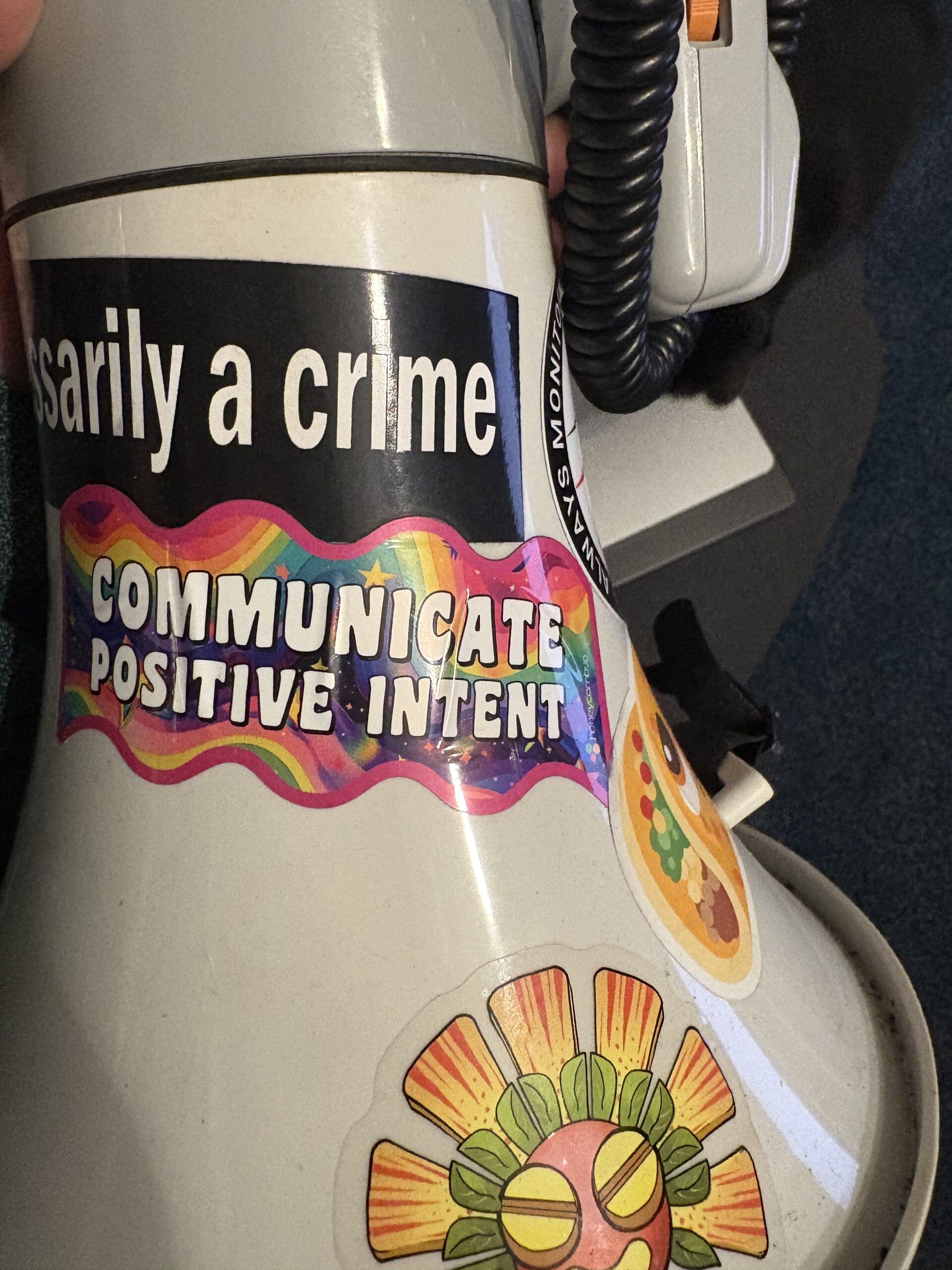
People will not open up and be actually present and interrogative if they don’t feel safe. It is your responsibility when setting up, facilitating, and debriefing to make sure the system is what is being critiqued, not the humans within it. The humans made the best possible choice they could given the circumstances they were in, so let’s change the circumstances in the future. Make this explicit early and often. As Charity says on the sticker on my megaphone, “communicate positive intent.”

A picture of a megaphone focused on a sticker in Lisa Frank obnoxiously bright styling, "communicate positive intent." Additional stickers that are visible are the Priceless Baroot, the edge of a pleading taco emoji, and one that seems to ready "...necessarily a crime."

Must be scoped well

If people don’t know what they’re talking about, they won’t talk about the same thing, and getting to concrete outcomes will become nearly impossible. Focus on a specific project, timeline, or outcome. Communicate this early and often.

Should encourage creative thinking

Whatever format you pick should be mildly novel (not so novel that it disrupts how people approach things, but novel enough to edge them out of their comfort zone). Use a different prompt set or a different tool, but rarely both at the same time. Ask more of people to engage and challenge them into someplace new.

Needs to lead to concrete, actionable tweaks

If you don’t arrive at experiments that will change how you’re behaving, you have wasted everyone’s time. I like to set aside about 1/4 of the time of the retro to listing, refining, and then selecting one or two these experiments. I ask the following questions:

  • What will change if we take this action?
  • What would prevent us from making the change?
  • How will we know if we’re successful or not?
  • When should we check back?
  • What is our next step, and who is responsible for it?

I only pick up 1-3 concrete steps to take after each retro. I track them just like any project, and I report back on them before the next retro to show that the time and vulnerability is worth it.

One goal should be building trust with the team

A core part of the system is team trust, and in improving the system, we should be focused on building that part of it. By being blame free, enacting suggestions, and pushing people to engage more, we build that trust. If something about the retro process is eroding trust, pause and reassess your approach.

Facilitating a distributed conference

I was pretty sure it was going to be a disaster the day before. Hell, the week before. Having multiple tracks of participatory sessions meant that people would need to move from video conference link to video conference link. We didn’t have a shared chat space consistent across all the “rooms,” and I was anxious to go to other links myself to gather people, leaving the core room unattended.

It could have been terrible. Instead, RecoveryCon was a smashing success, with people joining from all over the US, plus the UK, Germany, and Turkey. We ran (mostly) on time. We shared back what had happened in sessions. We cried a bit together. And we ended 3 minutes early.

Another blog post will happen soon with a summary of sessions, links to notes, and our Joy Gallery; but for now I wanted to tell you about facilitating a multi-track open-spaces style event. A caveat that a high proportion of my friends are facilitators and/or are tech savvy. YMMV.

The logistics

We had as many video conference “rooms” as we had tracks. This will come into play with the agenda. One “room” should be both a track and also where you start / regroup to. This means anyone coming to the conference at weird times is swept up in a session without extra overhead. It also gives a consistent sense of a “common room” that people know to go to if they get lost or booted or whatever.

Start a notes doc for each track, including headers for each session and reminders of when to come back to the main room. That way, folk don’t need to ask about it. It will be a bit of a Thing when times change and you have to go update each doc, but oftentimes folk will have already updated it for you. You will be able to see this in the notes doc when the content overview post goes up.

If I were going to do this again, I would have a chat of some kind with the session leads and facilitators to coordinate and remind about coming back. This time it worked out great, tho!

The agenda

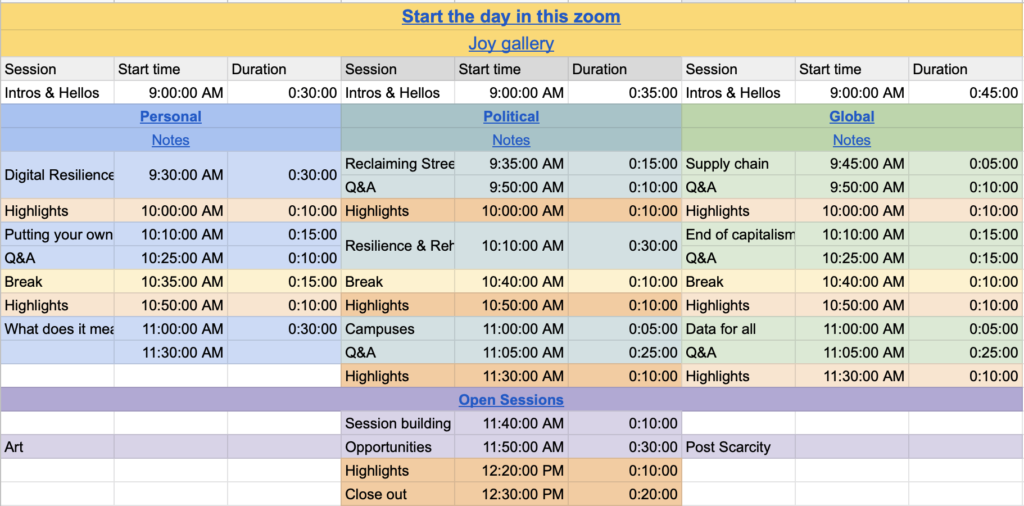
This was bananas to me. I am in the school of facilitation that does not share the agenda for an event, but rather encourages people to be fully present by asking them to trust me and giving folk whatever comes next as it happens. This time, I shared a spreadsheet of when various things were going to happen. This spreadsheet also provided a source of truth so far as links to video conference rooms and notes docs so folk could self-sort.

All sessions ended up being the same length of time, which was different than originally planned. I tried to add in complexity where it wasn’t needed, and we organically got back to a simpler state.

Expectation setting

In addition to a version of the participant guidelines from Aspiration I give (and was reminded to do so this time — thank you), we also had the expectation of all watching the clock together, and of returning to the main room. I asked at least once on each front for those to be repeated back to me, and made the main room clear in the communications emails sent out to attendees.

We also set the expectation of collaborative note taking as active listening and of reporting back on sessions so folk who went elsewhere still felt like they got something out of the sessions they missed.

Thank you

Thank you to all the amazing folk who came to RecoveryCon and made it what it was. Special shout out to Greg, for helping with organizing; to Liz, for having boundaries; to Adrienne and Heather for facilitating tracks; and to Cheryl, Beatriz, Nathan, sevine, Julie, Courtney, Lou, Ahmet, B, and two other folk I missed for leading sessions.

Facilitating distributed All Hands meetings

Originally posted on the Truss blog

All hands meetings are important – they are a way to spread a message, a way for a team to get to know each other, and a way to move a decision making process forward. They are easy to do wrong—to hear something everyone already knows a thousand times over, to be unclear, or to be a jumbled mess without enough time to accomplish a goal. I’ve run the numbers of how much we pay for an all hands meeting (something I can do with internal salary transparency), and the cost is nothing to laugh at. So why do we have these meetings so often (at Truss, once a week), and how can we make sure we’re getting the most of them?

We see facilitation as the way to get the most out of a meeting like this. I’ll arbitrarily define “meeting facilitation” here as the act of deciding what you want to get out of a gathering, planning for, and then constructing and maintaining a space and flow to optimize for achieving that goal with a group of people. This is different from presentations—which are also useful—as a presentation is about the clear delivering of a message by one or a small group of people to another set of people. It is possible to facilitate a set of presentations, especially if there is Q&A at the end.

Facilitating distributed meetings

As we’ve talked about before, facilitation changes when you have a distributed group. And so as Truss noses up past 70 (and still growing) we’re hitting new facilitation challenges. As our client base grows, and our internal operations change, and fewer Trussels know each other well, what do we want out of our all hands meetings (that we call “Practitioners’,” or “Prac” for short), and how can we be sure we’re achieving those goals?

Skill share

We know we don’t have all the answers at Truss, and so we wanted to have the conversation about how to further improve our practices with a broader group of people. Four Trussels (Sara, MacRae, Isaac, and Willow) were joined by Emily of honeycomb.io, Pam of One Medical, Aaron of CivicActions, Liz of Public Lab, and Mike of an undisclosed media company to skill share. The all hands we facilitate run from groups of a handful to in the 70s. Some of us rotate facilitators, some of us hold that honor for a prolonged period. Some of us are fully remote, some of us are clumped into rooms in different locations.

While you can get into the details by watching the video or reading the notes, our main categories of interest fell into engagement & participation, meeting purpose, and who is remote versus who is in person. We had a few main takeaways that we’ll be cross-pollinating across our organizations.

Facilitation Guild

Having a group of similarly dedicated folk within your organization can help up everyone’s game. Try out experiments together, lean on each other for support, and perform course corrections by having allies to check in with. We try out new things on our project teams and then share them back to the guild, helping the whole organization benefit from gains (and avoid and/or reproduce discovered failures!)

Collaborative decision making

While some of us (including Truss) still use all hands primarily as a way to disseminate information, Aaron of CivicActions and Liz of Public Lab told stories of making decisions as organizations during all hands meetings. This makes my robot heart sing with joy, and the Truss facilitation guild will be looking for ways to start doing this in our projects.

“Hand” in chat

As a group grows larger, it becomes more difficult to track who wants to say something, and in what order. We use the video conferencing software’s chat to raise a hand through text—literally typing “hand”—in order to signal we want to say something. Not only does it help the facilitator keep stack, it also gives time to folks who want to consider what they want to say before they say it

Banter / Side channel

Banter is a great way to keep everyone engaged—I may not want to take up everyone’s attention with the perfect gif in reaction to something that’s just been said, but if I have somewhere to post it, I’m more likely to stay engaged as are the folk looking at and responding to the gif. Using a side channel (so not distracting from the “hand” channel above) means everyone wins.

What’s next?

Huge shout out to all the folk who joined for this facilitation skill share—I’m excited about a lot I get to do, and this was still the highlight of my month thus far. To be able to share skills across organizations is rarer than I’d like in the private sector, and that’s just silly. We all do better when we all do better. I hope we have more reason to collaborate with each other to grow and uplift the spaces we’re in. Is there something you want to learn or share about?

There is a growing body of work around working from home and working from anywhere… as well as the practices individuals take to stay sane and healthy while doing so. But we’re lacking a supporting body of work in how to help groups work together well in this new distributed environment. Truss is beginning to codify our learnings into a distributed playbook, which we’ll share when it’s good enough to face the tumult of the internet. When it’s out, we hope you’ll join us in making it better.

Upping Our Distributed Practices

Originally posted on the Truss blog

While there are lively debates about whether or not the Future is Distributed, at Truss we’re having a pretty solid time of it. Running online meetings is just the beginning of making sure your distributed team is included, and we’re continually working to improve our distributed practices.

We have a running doc of practices we want to try. Our goal is to fail at least occasionally — it means we’re actually reaching further than our grasp. Here are a handful that we’ve recently tried, and to what result.

  1. Persistent distributed video : quiet failure
  2. Being Humans Together : resounding success
  3. #in-out-status : success
  4. Synchronized cupcake delivery : failed, but worth a re-attempt

Persistent distributed video

One of the things we missed most in becoming fully distributed was the human bonding time we got with our rad coworkers while in the office together. One of our attempts at addressing this has been a standing video link which people can jump into and out of to “cowork” with each other. There’s sometimes some idle chitchat, and then often heads-down working.

It ended up not working for a few reasons:

  • being on it as the same time as other folk is rare;
  • we have a culture of scheduling time to talk about specific subjects rather than hoping it happens organically;
  • the standing video link quickly became “invisible.”

Result : quiet failure

Being Humans Together

Getting distributed folk in a video in a coordinated way to talk about Not Work is now a standing half-hour weekly timeslot. It is some Trussels’ favorite part of the week. We do a couple different formats:

  • if under 9 participants, each person gets 2 minutes to talk about anything at all they want to, so long as it’s not work.
  • if it’s more than 9 participants, a quick checkin happens on how people are feeling, and then breakout groups of 3-4 people each for a deeper dive.

We sometimes have a prompt (“what’s one story about you that you think really represents what you’re like?” or a show-and-tell.

Breakout functionality in video conferencing software has been amazingly useful. So far we’ve done these randomly, but at some point we might try self-selection into these “rooms.”

Result : resounding success

#in-out-status

Has this ever happened to you? You log in on the East Coast after a sick day, and you have no. idea. what is going on with different stories. Did someone delete that blocker, or has it been worked around? And it’s 3 hours before anyone else who might know what’s going on will be online.

We now have a Slack channel called #in-out-status where people give a brief summary of the status of what they were working on before they go out for the day. It’s evolved to be a place where we also flag when we’re in for the day, going to lunch, taking a sick day, etc.

Result : success

Synchronized Cupcake Delivery

The project I manage recently hit a big milestone in October. While it was more of a non-event than our June release, there was still some stress around it, and a celebration was warranted. I set up a 2-hour session — the first hour of which was to catch up with each other (similar to Being Humans Together, but less structured), and a second hour to wander around where each of us is, and post pictures back to the group. The pictures were to put everyone on equal footing, rather than prioritizing office Trussels.

Also, during the first hour, I had lined up (what I thought would be) synchronized treat delivery to people regardless of location, scheduling deliveries for the time of the zone of delivery (IE, deliveries marked for 11:30 PT, 13:30 CT, and 14:30 ET in the interface should all arrive at the same point in time).

It ends up this is not a use case for this particular delivery service.

While all the cupcakes (plus one cookie order and one bundt cake order for some destitute places of the world which don’t have cupcakes available for delivery) for people in my timezone arrived as expected, 2 folk received theirs at the time requested but in MY timezone (hours late), and 2 received theirs hours early (for conversion errors I don’t understand).

download.png

While it didn’t work out this time, everyone felt included and celebrated. Definitely worth trying again at some point.

Result : failed, but worth a re-attempt

Well Met: Equity by Hackathon Awards

Originally posted on the Truss blog

Hackathons are a way for a community to rally around a cause, to learn from each other, and to push collective work forward. Here’s some research on it. Hackathons are also about publicity and headhunting. Think about the last few hackathons you read about. The piece was probably about the winners. Hackathons are, in general, further the “one great man” narrative.

But feminist hackathons now exist. We wrote a paper on the 2014 Make the Breastpump Not Suck! Hackathon which was about exactly that. But one thing we didn’t get quite right in 2014 was awards.

So for the 2018 Make the Breastpump Not Suck Hackathon, we took a different approach. We made our objectives explicit and described how we would reach towards them by devising a strategy, putting that into a process, and then implementing. This post is about that journey.

Explicit Objectives

Awards are often used to reward the most “innovative” ideas. Prizes are often given out of the marketing budgets of businesses, based on the anticipated attention gained. In contrast, when I have given prizes at open access and disaster response events, I have focused on rewarding the things one’s brain doesn’t already give dopamine for – documentation, building on pre-existing work, tying up loose ends. Our goals for the MtBPNS award process were few, and at first glance could seem at odds with one another. We want to:

  1. encourage more, and more accessible, breast pumping options, especially for historically marginalized populations;
  2. support the burgeoning ecosystem around breast pumping by supporting the continuation of promising ideas, without assuming for- or nonprofit models; and
  3. recognize and celebrate difference and a multitude of approaches.

Slowing down

There’s also an implicit “f*ck it, ship it” mentality associated with hackathons. The goal is to get a bare-bones prototype which can be presented at the end. But combatting *supremacy culture and ceding power require that we slow down. So how do we do that during a weekend-long sprint?

What’s the road from our current reality to these objectives, with this constraint?

Devising a Strategy

Encouraging more options and supporting continuation assumes support through mentorship, attention, and pathways to funding. Each of these could be given as prizes. Celebrating difference assumes not putting those prizes as a hierarchy.

Non-hierarchical prizes

First and foremost, we decided upon not having a hierarchy to our prizes. We put a cap on the maximum value of awards offered, such that the prizes are more equal. And, unlike last time, we removed cash from the equation. While cash (especially for operating expenses) is a vital part of a project moving forward, it complicates things more than we were set up to handle, especially in immediately setting up a hierarchy of amount given.

Strategic metrics

Half of our judges focused on strategic movement towards our objectives, and the other half on pairing with specific prizes. The strategic judges worked with our own Willow as judging facilitator and the MtBNS team to devise a set of priming questions and scales along which to assess a project’s likelihood of furthering our collective goals. You can see where we ended up for overall criteria here.

Awards offered, and who offered them

The other half of the judges were associated with awards. Each award had additional, specific criteria, which are listed on the prizes page here. These judges advocated their pairing with teams where mutual benefit existed.

The process we thought we would do

Day 1

  1. Post criteria to participants on day 1
  2. Judges circulate to determine which teams they’d like to cover
  3. Map the room
  4. Judges flag the 10ish teams they want to work with
  5. Teams with many judges hoping to cover them are asked their preferences
  6. Run a matching algorithm by hand such that each team is covered by 2 award judges and 1 or 2 strategy judges. Each judge has ~5 teams to judge.

Day 2

We hosted a science fair rather than a series of presentations.

  1. Everyone answered against the strategic questions
  2. Judges associated with a prize also ranked for mutual benefit
  3. Discussion about equitable distribution

Award ceremony MC’d by Catherine. Each award announced by a strategy judge, and offered by the judge associated with the award.

Where it broke

The teams immediately flooded throughout the space, some of them merged, others dissipated. We couldn’t find everyone, and there’s no way judges could, either.

There’s no way a single judge could talk to the 40ish teams in the time we had between teams being solid enough to visit and a bit before closing circle. Also, each team being interrupted by 16 judges was untenable. The judges came to our check-in session 2 hours into this time period looking harried and like they hadn’t gotten their homework done on time. We laughed about how unworkable it was and devised a new process for moving forward.

Updates to the process

Asked teams to put a red marker on their table if they don’t want to be interrupted by judges, mentors, etc.

  1. Transitioned to team selection of awards.
  2. Made a form for a member of each team to fill out with their team name, locations, and the top three awards they were seeking.
  3. Judges indicated conflicts of interest and what teams they have visited so we can be sure all teams are covered by sufficient judges.

Leave the judging process during the science fair and deliberation the same.

And — it worked! We’ll announce the winners and reflections on the process later.
Well Met: The Online Meeting

Originally posted on the Truss blog

There are many valid reasons to consider having an online meeting — maybe your squad is spread across multiple time zones or just different regions, or maybe you’re trying to foster a time of inclusive change at your org. However, with that optimistic reach for cohesion comes some real risk: online meetings are, inevitably, much more difficult to do effectively than in-person ones.

These two meeting types do share some goals: not having a single talking head, needing to pay attention to the “room’s” temperature, needing an agenda and a dedication to timekeeping. What changes is that people are even more likely to be distracted and less likely to engage, reading a room is different, and audio/technical issues are exponentially more likely as more people join.

To host a successful online meeting, you’ll ideally have:

  • an agenda;
  • strong, uninterrupted connections for each attendee;
  • a conferencing system that allows for “hand raising” or other signals;
  • a place for notes to be taken collectively;
  • someone whose sole task during the call is dealing with technical issues (at least until the system and participants are tried and true).

Adjusting your own expectations is also a useful exercise. I think of online meetings as a block of time everyone has offered to spend attention on the topic at hand… not that they’ve agreed to listen, nor (if they aren’t listening) to speak. Maybe I’ve simply admitted defeat too early.

How to be remote

When it makes sense

If anyone on your team is remote, everyone on the team should act remotely. Sometimes we have 4 or 5 people of a 6-person team in the same room but on laptops for a Truss meeting. We do this because the moment meetspace is prioritized is the moment you’re not able to hear your remote crew. They matter. That’s why they’re your crew. Invest in noise-cancelling headphones and a reliable conferencing system.

When you simply can’t all be online, have a person in the room dedicated to watching for signals from the online crew that they want to speak, can’t hear, have questions, etc.

Temperature checks

It’s harder to gauge how people are feeling during a meeting when it’s not in physical space. Are shoulders slumped because energy is low or because proper posture at a desk is hard? Are people looking away because social media truly is a fascinating cesspool, or because they’re displaying the video on their other screen? WHO KNOWS. Here are some ways to read a digital room.

  • Optimize for how many people you can see at once. Zoom gallery mode works well for this. There’s even a special setting for sharing a screen on one screen and still having gallery mode on the other screen if you’re sufficiently decadent to have more than a single screen to work from.
  • Be sure to check in on people you can’t see. People still call by phone to video sessions; that’s part of their beauty. But not seeing someone’s face means not only are their reactions not included in temperature checks, but also that sometimes we even forget they’re there. Make a conscious effort to include them.
  • Set (and stick to) how people “raise their hands.” We often use the “raise hand” button in Zoom to help the facilitator keep stack. This is because, again, lack of physical bodies means a sudden lean into a camera might be someone getting comfortable, not wanting to jump into the conversation.

Some tools have options to use (or adapt to use) for polling, including Zoom and Maestro. These can be used for a multiple-choice question, for voting on if a proposal should pass, and for flagging technical issues.

Technical support

One of the most distracting and time-consuming aspects for the facilitator (thereby impacting everyone else on the call) is a participant experiencing technical difficulties. “Are they ok? Is it their setup or ours?” One of the easiest wins for online calls is to have a person dedicated to troubleshooting technical issues. While the facilitator moves the group towards the meeting goal, the troubleshooter can help everyone engage fully.

Agenda and what you ask of participants

Online meetings don’t have to be a time during which everyone half-listens-in while perusing parts of the internet with the other half of their attention (we’ve all done it). Your goal as facilitator is to offer opportunities for people to engage even when not fully listening to the speaker. Having other things related to the topic to work on assists in maintaining and regaining attention.

Collective note taking and asynchronous questions

In contrast to fully in-person meetings, where it’s reasonable (even vital) to ask people to put away their devices so their attention can be maintained, remote meetings take place on the distraction device. One of the best ways to keep people engaged is to ask for their help in documenting. Multiple people can take notes in one place, with others cleaning up typos or adding in links. This can evolve into a “live blog,” and/or will sometimes spark side conversations in nested bullet points. Both add depth and thoroughness to something that might otherwise be a bare-bones skeleton not much better than the agenda itself. Taking notes this way can lead to documentation like this.

Taking this approach also helps those who are joining late or having audio issues — they can follow along in the notes to catch up, or to read ideas they weren’t sure they heard correctly.

Breakout groups and other activities

Breakout groups and other activities can still happen when meeting online, it just takes a bit more planning and group robustness than doing it in person. Zoom and Maestro both have a breakout-room functionality, for instance, which allow you to randomly or directly assign people to rooms, to indicate when wrap-up times are nearing, and to regroup people. You might also set up jit.si or Google Hangout rooms in advance for breakouts, and include the links to the breakouts in your notes. Asking people to maintain documentation from these breakout sessions in the main set of notes ensures a cohesive understanding is still maintained across all groups.

Activities such as spectrograms can also be adapted to online space – when using collaborative note taking, put a grid into the space, like so, and then have people move their cursors if visible (Google Docs) or mark an “x” if highlighted by color code (etherdocs) based on where on the spectrum they “stand.”

We’d love to hear how you engage with folk in online meetings – it’s a growing art form, and we’re still wet behind the ears ourselves!

Well Met: Upping Your Facilitation Game

Originally posted to the Truss blog

We talk a fair amount on this blog about how to have better meetings. And we should! Taking the time for some meetings will save time over all… but it’s a delicate matter and one of great responsibility. But let’s say you feel like you get it. You’re the person charged with meetings going well, and you know which agile ceremonies are worth having regularly, how to determine other things worth discussing synchronously, and how to create and stick to an agenda. But you get it, and you’re hungry for more. This post should help you get here by:

  • offering structure by which to share skills and…
  • suggesting when to deviate from (or go without) an agenda.

By including better facilitation practices in more aspects of your work, group dynamics will improve overall and everyone can focus on the actual work at hand.

Skill Shares

The more team members in a room know how to facilitate, the easier the conversation can be. Two ways to increase capacity in your organization are by mentorship and encouraging behavior which allows a group to facilitate itself.

We already talked a bit about how to mentor other facilitators in Well Met: The Facilitator, but it merits a deeper dive. To mentor other facilitators, first look for the helpers. Ask folks who see others raising their hands, help get a conversation on track, etc to review agendas with you. If they’re interested in trying out facilitation, backchannel while they or you facilitate, and debrief afterwards.

To get a group to be better at facilitating itself, ask folks to cue the person who comes after them in stack. Then, encourage people to self-regulate for time and how many points they make (one of the “Rules of 1”). Finally, work to get folks to cede the floor to someone who has spoken less than they have, often by prompting a quieter person with a question.

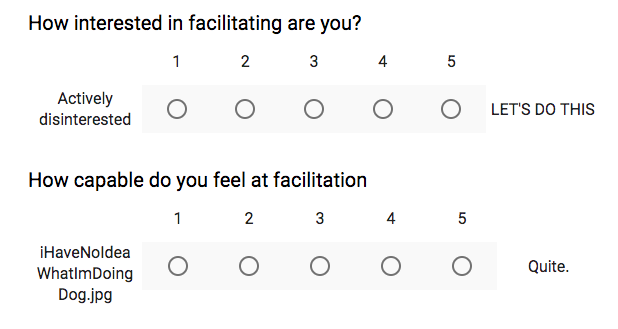
At Truss, we ran a quick 2-question survey to pair those interested in facilitating with those who already feel comfortable doing so. We stagger by skill level, so everyone has a chance to be in both a supporting and lead role.

internal facilitation survey screenshot.png

We are Very Serious People.

When to deviate from the agenda

In Well Met: The Meeting Itself, we talked about how to create an agenda and then facilitate from that arena. This is an important and useful thing to do for a good long while, if not indefinitely. However, if you find yourself thinking “oh, I know what would totally work better instead!” and you’ve built trust with the group, it’s time to deviate.

My agendas, while well planned, often get tossed out within 5 minutes of any meeting starting. It’s similar to agile practices in that way – the preceding research and planning gives a solid sense of what problems are being solved and awareness of the context; but flexibility to adapt (or throw out) a plan based on what is most needed in the moment of action to achieve those goals. Because you’ll have facilitated many different sessions at this point, and tried out a lot of different facilitation practices, your toolbox and skill will be substantial enough to try something that seems more appropriate in the moment than your plan.

Taking a self-assured, but mildly cavalier approach to this is one successful approach to getting group buy-in for these deviations. “Well, I thought we were going to do X, but now that’s not going to help us get where we need to be, so we’re going to do Y instead. Any concerns about that?” while making eye contact to assess before moving on works well. Also sometimes “Wow Past Me has some terrible ideas. We clearly don’t need this entire next section in order to achieve our goal. Let’s skip it and save some time, shall we?” This needs to always be coupled with a reminder of what the goal of the meeting is, to keep all conversations on track.

Sometimes, if sufficient trust has not been built up, people will take this opportunity to discuss how the discussion will happen. Time box this and move on when the time box is done.

Other times, in groups with a particularly high level of trust, I won’t even share my agenda, which gives me leeway to adapt without making excuses. That said, I will have absolutely made at least one agenda in advance.

Where we’re going we don’t need agendas

And then sometimes there’s so much confusion about a topic that the meeting itself is to resolve the confusion. In which case it’s highly unlikely you get to have a traditional agenda. If this is the case, have a solid sense of who needs to be there and how the conversation might start. You might discover other folks are needed partway through, or that someone could be using their time better elsewhere. Apply the “law of two feet” here and let folks leave if they’re not needed.

As your comfort in facilitation grows alongside your activity toolbox, your ability to adapt in the moment will likely increase. To gain the benefits of that increased skill, allow yourself more flexibility while building out a stronger overall capacity in your organization. By

  • offering structure by which to share skills and
  • suggesting when to deviate from an agenda,

group dynamics will improve overall and everyone can focus on the actual work at hand.

Well Met: The Facilitator

Originally posted to the Truss blog

We’ve all been in dead-end meetings. No matter how dedicated and efficient your team is, a few bad meetings can derail their productivity and, even worse, their morale. In the next post of our series on maximizing the value of meetings, we talk about one of the aspects of a good meeting: the facilitator.

Practice the techniques highlighted in this series to:

  • increase the effectiveness of meetings;
  • decrease the number and duration of meetings;
  • build team cohesion;
  • cross-pollinate information across teams; and
  • do so in a way which leads to new insights otherwise left buried.

You’ve learned how to determine whether you need a meeting and how to prepare for and drive those meetings, now we highlight how we select for that facilitator.

Who does this?

It’s a lot to take on. Plotting a course for effective meetings means setting aside time to discern if a meeting is actually needed, preparing for it, and assigning a dedicated person to facilitate the meeting. An important thing to note is that facilitators will participate differently in in a meeting. Experienced facilitators have a responsibility to not add their editorial opinions, and beginners may have a hard time facilitating while also joining a conversation.
 

Project managers as facilitators

In Waterfall, big plans are defined, then staff are tasked with executing a predetermined set of requirements. Project managers are responsible for tracking if individuals or departments are meeting deadlines such that the entire Gantt Chart stays on track.

In lower-case-a-agile, we see the project manager as facilitator rather than task tracker. The project manager should be primarily focused on creating uninterrupted time for the team, while also keeping an eye out for when sharing information would make that working time even more effective. This means the project manager should already have an eye out for meetings that would benefit the team and guard against those that won’t (our first post in this series). The project manager should have their finger on the pulse of what folks are up to so much of the work for agenda prep is already done (our second post in this series). Because agile team members are entrusted with finding the best route to solving a given problem, the project manager’s goal is to open and maintain the space for meaningful conversations, which points to the facilitation aspect of useful meetings (also the second post).

In short, at Truss we are structured to put project managers in the best position to uphold the responsibilities put forth in this series. But it’s not just on them.

Increasing facilitation capacity in your org

Facilitation is a core component of being a servant leader. But just as with any attempt at organizational change, it’s difficult for a project manager to come in and implement all this. A nurturing environment cultivated by the leaders of the organization means facilitation as a skill can build up throughout the organization. For this reason, when a project manager is unavailable, we tend to lean toward someone with experience in facilitation, and who doesn’t have a personal stake in the meeting itself. This could be an engineering lead, design lead, product manager, business lead, or founder. They often have additional authority and responsibility to a client.

Project managers can’t (and shouldn’t) be in every meeting. Whether there are multiple meetings happening at once or it just doesn’t make sense for the project manager to attend, other folks in the organization should also be upping their own facilitation game through facilitation mentoring. Project managers can support this by guiding a mentee through the agenda-building process, backchanneling about facilitation practices, flagging issues during meetings where a mentee and facilitator are both present, and debriefing afterward about questions or concerns.

Why would I want to be a facilitator?

To do so helps everyone make equitable space for others, amplifying the voices that might otherwise go unheard and the fountain of good ideas which accompanies that.

It also makes meetings go that much more smoothly, as the team is thinking about how to be effective and inclusive while maintaining focus on the objective. Learning to watch for signals and respecting stack can be distributed across the group, which helps everyone manage themselves.

Read more about deciding when to have a meeting and how to prepare for and drive an effective meeting to have the full impact this series offers.

Why are we doing all this?

Bad meetings, like bad policies and negative environments, are tractable problems. By following the techniques highlighted here around determining when to have meetings, how to prepare for them, and how to facilitate, your meetings can be worth the context switching they require.

Good facilitation allows you to have fewer meetings, and the ones you do have will:

  • be more impactful,
  • be more effective,
  • build team cohesion,
  • and lead to new insights otherwise left buried.

You can help make it happen!

Well Met: The Meeting Itself

Originally posted on the Truss blog

Everyone has been in a meeting that made them wonder, “What am I doing here?” While a meeting can be a productive way to drive a project forward, many meetings are the opposite—they disrupt productivity and waste valuable time. All it takes to ensure that a necessary meeting doesn’t go off the rails is a little bit of planning and someone to facilitate the process.

The first part in this series covered the hows and whys of determining that a meeting is necessary. Once you know you need one, it’s important to make the best use of everyone’s time. This requires some preparation in advance, and active attention to keeping the meeting on track.

Create an Agenda

Building an agenda is the most important, difficult, and fungible part of meeting facilitation. Here are the steps to developing a solid agenda:

  • What concrete outcome do you need to get out of the meeting? You should be able to say this in one sentence. It should be the name of the meeting, and be included in any correspondence related to the meeting.
  • Create a plan. Consider where the group is now (point A), and where they want to end up (point B). You likely need to talk to other people in order to figure this out.
  • Identify your requirements and blockers. What would need to happen to get from point A to point B?
  • What is your strategy for tackling these challenges? Pick activities that will help achieve the concrete outcome needed to get from point A to B. Search the internet for “facilitation activities” for some suggestions. A few of our favorites are:
    • Spectrograms to explore just how divisive various issues are.
    • Vizthink to externalize systems in people’s heads in a way that allows progress to be made.
    • Breakout groups to allow more people to be heard about a topic.
  • Who are the leaders who can push this project forward? To push power outward, you’ll ideally work with a different person to lead each part. This isn’t The [Facilitator’s Name Here] Show

Time management is the hardest thing to get right at first. Here are some ways to effectively manage meeting time:

  • Pad for time.
    • People will show up late. Decide how long you’re willing to wait (keep in mind waiting wastes everyone else’s time and sets a bad precedent) and stick to it. People will show up on time more often if they know you start on time and meetings are valuable experiences.
    • A/V will break. Showing up early to troubleshoot can save others time, but you can’t fix the remote setup.
    • Folks will want to dig into questions that matter, and having some extra time allows this to happen.
  • Remember to have time to open and close. Rituals matter!

If you are new to facilitation, your agenda is your guide. The signposts you set in advance will help you remember how to get where you’re going when matters inevitably become complicated. As you become more experienced and gain trust, the agenda becomes more of a thinking exercise so you can adapt in the moment.
 

Facilitating

You’ve done all the work, you’re ready to try out your well-crafted agenda, and people are on the call or at the table (hopefully on time). What do you do now?

  • Set expectations around communication. Two suggestions we have found the most useful are:
    • Demonstrate respect for each other (and the clock) at all times.
    • Follow the Rules of 1:
      • Make 1 point and pass it on. This distributes the conversational load across more people, which means more people get heard from.
      • 1 diva, 1 mic. Only one person should be speaking at a time, which prevents people speaking over each other, difficulty hearing for those dialing in, and gives equal attention to all speakers.
      • Have 1 empty chair at the table/1 available slot for call-in. This makes it welcoming (and non-disruptive) for that latecomer (or someone from a different breakout session) to join you.
      • Speak 1/Nth of the time. If you’re quiet, know people want to hear from you. If you’re gregarious, dial it back a bit to make room for others.
    • Once you’re comfortable with those, consider adding in hand signals (Zoom and Maestro also offer approximations). These can save time by getting a “temperature check” on how the team is responding to a current thread without needing to hear from individuals one-by-one.
    • Aspiration, an organization focused on building technical capacity for nonprofits has some pretty great participant guidelines that are useful to adapt to your own circumstances.
  • Take “stack.” People signal to the facilitator or the stack keeper when they’d like to speak up in a discussion. The facilitator might call on people in the order they signaled, or they might change the order to have more equal speaking time based on the stack and to account for folks who have spoken less.
  • Stop a speaker from going on too long. (You’ve already made this OK to do if they make more than one point or if they speak more than 1/Nth of the time.) You can do this through body language, hand signals, and directly speaking to the person.
  • If people get into eddies of conversation (this often happens with two people going back-and-forth, rather than the group being engaged), push for a choice to be made, or if that can’t happen, clarity to be reached. This will encourage the discussion to move forward to a place where ideas can be tested by coming in contact with reality. If people truly need more time, offer to schedule a meeting specific to that topic (with a concrete outcome) so people can return to the subject at hand.

Who should be responsible for all this work? In the final part of this series, Well Met: The Facilitator, we’ll talk about what makes a good facilitator and how to choose the right person for the job.